Corso! Sprint 03
03 Feb 2026This is the first one in 2026, after vacations with no computer just enjoying nature, surfing, and reflecting on where I’m headed. Sprint 03’s goal was to make Corso! more reliable for beta usage. We’ll cover the progress next.
Adding a user context
Corso! is live on Azure and one of the points I’m not happy with is that pretty much anyone could access the vault. Even though Sprint 02 secured it with cookie authentication and a master password, I didn’t want to leave it open for anyone to brute-force the master password. I can leverage reliable features from Azure, including Easy Auth, a built-in secure authentication mechanism that doesn’t require code changes. It essentially adds a front-door to your application only invited users can access it.
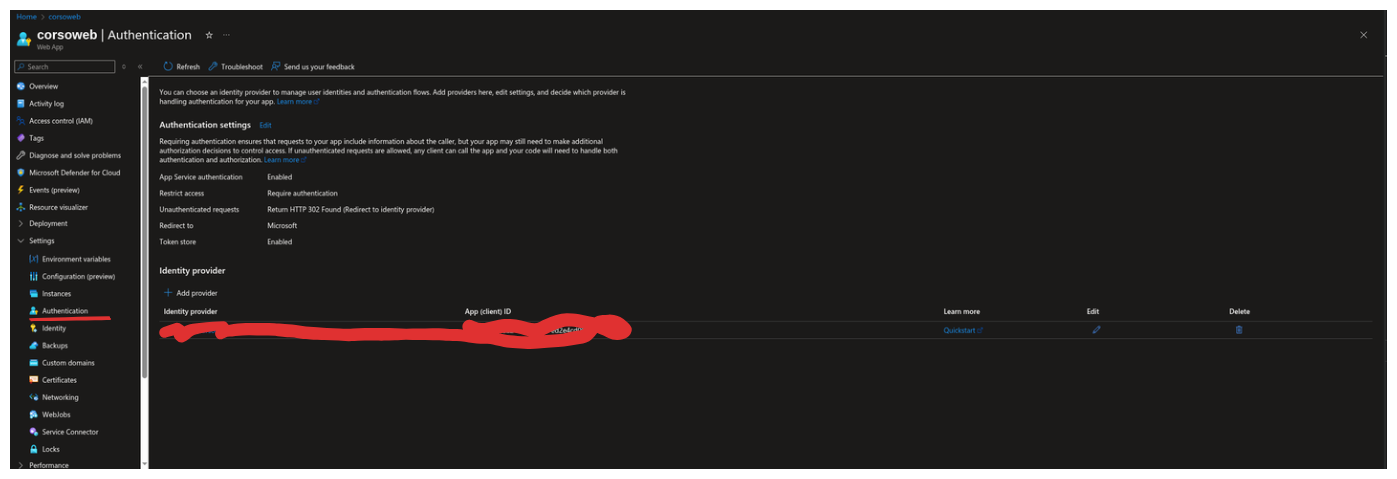
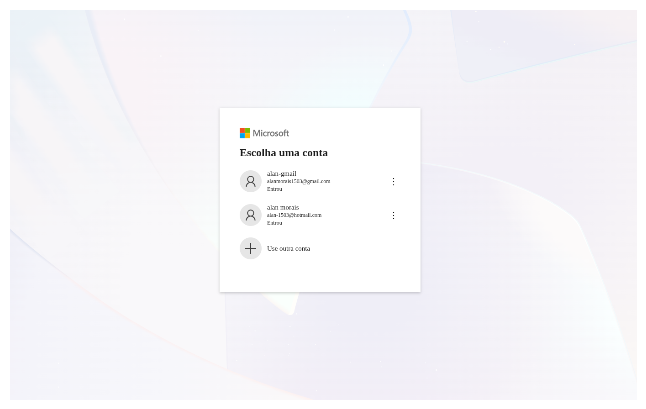
I won’t cover the details in depth because I believe it’s intuitive. There’s well-documented Microsoft documentation on how to use it. In summary, you can “Add Provider” and choose your preferred authentication provider. In my case, I’m using the Microsoft one combined with Microsoft Entra ID, so I can even invite external users interested in Corso! I tested it with another Gmail account.
Csv Upload
To make it useful somehow, I would need to dump all my registered accounts from 1Password to Corso! I found that it is possible to extract a CSV from there, and all relevant information I need is contained in the file. My decision was to create an upload mechanism tailored for the 1Password CSV file.
Usually, the default decision is using a library that can parse CSV files. Parsing can have so many edge cases that sometimes it makes sense to use one. However, my philosophy here is to use as little third-party code as possible; only in areas where there’s an obvious security risk. I offload the work to someone who’s already handled the problem.
Most features I’ve built so far weren’t complex, so manual testing was enough to guarantee correctness. A parser is different. I’ll read a CSV string and parse it into a C# POCO using reflection, which adds some spice to the work.
Unit tests will be a smart way to guarantee I’m moving forward correctly and at a good pace.
The parser design takes 2 steps: first, Validation I guarantee the file is valid and parsable; second, the parse itself. Below is the controller using the parser.
[HttpPost("import")]
public async Task<ActionResult> Import(IFormFile file)
{
    if(file is null || file.Length == 0)
    {
        return this.BadRequestProblem("File", $"The file {file?.FileName} was not imported because is empty.");
    }

    using var stream =  file.OpenReadStream();
    var validation = await csvParser.ValidateAsync<Account>(stream, _ => _.Id);

    if(validation.Error is not null)
    {
        return this.BadRequestProblem("File", validation.Error.Message);
    }

    var accounts = await csvParser.ParseAsync<Account>(stream, _ => _.Id);
    await vault.UnLockAsync();

    foreach(var account in accounts)
    {
        vault.Add(account);
    }

    await vault.LockAsync();
    return Ok();
}
I accept a file as input and open the stream, which guarantees I won’t exhaust server memory. I’m usually dealing with small files, which makes things easier. Most are buffered into memory, but for larger files, the framework saves to a temp location. Since this is multi-part reading with boundaries, we can read in chunks without crashing. After opening the stream, I delegate to the parser. If any error occurs, I return a bad request using a helper method to ensure consistency with the Problem Details pattern I’ve been using.
The parser
Validation first
I exposed a validation mechanism to help developers guarantee the file is consistent before parsing. Since the parse method throws an exception if it finds unexpected input, the ValidateAsync method helps avoid letting it throw and be handled at the app level; which is often not ideal. There are performance concerns with APIs, and if you can always provide a way to prevent exceptions, that’s better. Exceptions are more like a big warning to the developer to act promptly on the issue.
As mentioned earlier, I chose to write unit tests for this case since parser logic can be complex with many edge cases easy to break. However, I wouldn’t write unit tests for the whole app, especially in early stages when you’re still collecting feedback on the right abstractions.
Tests
[Fact(DisplayName = "When validate it should return a error message when header is empty")]
    public async Task EmptyHeader()
    {
        //Arrange
        var emptyCsv = string.Empty;

        //Act
        var actual = await _csvParser.ValidateAsync<Poco>(emptyCsv.ToMemoryStream());

        //Assert
        Assert.False(actual.Succeeded);
        Assert.Equal(CsvParser.ErrorTypes.EmptyHeader, actual.Error?.Type);
    }

    [Fact(DisplayName = "When validate it should return a error message when header does not match `POCO`")]
    public async Task HeaderDoesNotMatchPoco()
    {
        //Arrange
        var badCsvHeader = @"badName, badQuantity
                           testName, 20";

        //Act
        var actual = await _csvParser.ValidateAsync<Poco>(badCsvHeader.ToMemoryStream());

        //Assert
        Assert.False(actual.Succeeded);
        Assert.Equal(CsvParser.ErrorTypes.HeaderDoesNotMatch, actual.Error?.Type);
    }

    [Fact(DisplayName = "When validate it should return success when header matches `POCO`")]
    public async Task MatchingHeader()
    {
        //Arrange
        var csvContent = @"title, quantity, username
                          titleName,testName, 20";

        //Act
        var actual = await _csvParser.ValidateAsync<Poco>(csvContent.ToMemoryStream());

        //Assert
        Assert.True(actual.Succeeded);
        Assert.Null(actual.Error);
    }

    [Fact(DisplayName = "after validate stream it should be able to read again")]
    public async Task CanReadStreamAfterValidation()
    {
        //Arrange
        var someStream = new MemoryStream([1, 2, 3]);

        //Act
        await _csvParser.ValidateAsync<Poco>(someStream);

        //Assert
        Assert.True(someStream.CanRead);
        Assert.Equal(0, someStream.Position);
    }
If you notice, the tests are small and focused. I wrote a few to guarantee the main validation logic works. I avoid using test doubles (mocks, stubs, fakes) as much as possible. They can help with external systems you don’t control, where you can mimic behaviors to enhance testability. In my case, I use a memory stream to simulate a CSV in a stream, and it worked well. One metric I track is how easy tests are to write and how often they catch real bugs when they break. If tests break frequently with no actual bugs, that’s a sign your test suite is too fragile and needs rethinking. Perhaps you’re exploring the design or testing implementation details too closely. In those cases, the best approach is to delete the test and revisit when the idea matures. For conventions, I tried many approaches and stick with naming tests by scenario (e.g., MatchingHeader) with descriptive display names using Gherkin syntax loosely. I also find splitting Arrange, Act, Assert sections useful.
Code
public async Task<ValidationResult> ValidateAsync<T>(Stream stream, params Expression<Func<T, object>>[] doNotValidate)
{
    if(!stream.CanSeek)
    {
        throw new InvalidOperationException("Csv parser only support seekable streams!");
    }

    try
    {
        using var reader = new StreamReader(stream, leaveOpen: true);
        var header = await reader.ReadLineAsync();

        if (string.IsNullOrWhiteSpace(header))
        {
            return new ValidationResult()
            {
                Error = new Error
                {
                    Type = ErrorTypes.EmptyHeader,
                    Message = $"The header is empty."
                }
            };
        }

        var fieldsFromHeader = header.Split(",", StringSplitOptions.TrimEntries);
        var givenType = typeof(T);
        var propertiesFromGivenType = givenType.GetProperties();
        var missingFields = new List<string>();
        var doNotValidateNames = GetNames(doNotValidate);

        foreach (var prop in propertiesFromGivenType)
        {
            if(doNotValidateNames.Contains(prop.Name, StringComparer.OrdinalIgnoreCase))
            {
                continue;
            }

            if (!fieldsFromHeader.Contains(prop.Name, StringComparer.OrdinalIgnoreCase))
            {
                missingFields.Add(prop.Name.ToLower());
            }
        }

        if(missingFields.Count > 0)
        {
            return new ValidationResult()
            {
                Error = new Error
                {
                    Type = ErrorTypes.HeaderDoesNotMatch,
                    Message = $"The header does not match with provided type: {givenType.Name}, missing fields: {string.Join(", ", missingFields)}."
                }
            };
        }

        return new ValidationResult()
        {
            Succeeded = true
        };
    }
    finally
    {
        //Always set stream to the begin for re-read.
        stream.Seek(0, SeekOrigin.Begin);
    }
}
At first, there’s validation for seekable streams. This is necessary because the class is designed for two steps, and I want validation to avoid side effects on the caller’s stream. The stream stays open, and we reset it to the beginning in the finally block. If the stream isn’t seekable, I can’t rewind it.
I also added a doNotValidate option to exclude POCO properties that don’t perfectly match the CSV columns for example, the ID of an account, which is generated by the Vault. The loop uses reflection to compare property names from the given type against the CSV header. If any property isn’t found, it’s added to the missing fields collection, and later an error is returned to help identify where the mismatch occurred.
Now parse it
I won’t go over the parsing logic tests, but they followed the same guidelines as the validation logic; small, focused, easy to write, and most importantly, they give feedback if I’m doing B/S. Below is the implementation. It was simple to write for my specific use case without relying on any library. For now, that seems like the right choice.
Code
public async Task<IEnumerable<T>> ParseAsync<T>(Stream stream, params Expression<Func<T, object>>[] excludeFromParsing)
{
    var reader = new StreamReader(stream, leaveOpen: true);

    var headerLine = await reader.ReadLineAsync()
        ?? throw new InvalidOperationException("File header cannot be empty!");

    var excludedPropNames = GetNames(excludeFromParsing);
    var indexesFromType = MapIndexesFromType<T>(headerLine, excludedPropNames);
    List<T> parsedItems = [];
    //starts at 2 because of header.
    var lineNumber = 2;
    while(!reader.EndOfStream)
    {
        var line = await reader.ReadLineAsync()
            ?? throw new InvalidOperationException($"Csv line {lineNumber} is empty.");

        var parsed = ParseItem<T>(indexesFromType, line, lineNumber);
        parsedItems.Add(parsed);
        lineNumber++;
    }

    return parsedItems;
}
The function is smaller than Validation(), so I took more time to create abstractions that make it easier to maintain. We start by extracting property names from the expression tree to identify which properties to exclude from parsing. I use a dictionary returned from MapIndexesFromType() that tells me the position for each property value. For example: account name at index 0, title at index 1. This map serves as the foundation for parsing each CSV line using reflection to assign values to the correct properties.
Finally, we loop through the stream, reading each line and converting it to the target type. The ParseItem() method splits each line by commas and uses the map to determine which array position corresponds to each property, then assigns the right values through reflection.
Sprint 04
The next sprint will be the last one working on Corso! I’ll take a break to focus on other fronts, like open-source, however still documenting everything on this blog that I find relevant.
I already started to do some beta usage of the app and it is almost there. There is some little inconvenience, since this is free hosting on Azure sometimes this is pretty slow to bootstrap, but I can stay with it.
The last sprint before focusing on anything else, I’ll fix the user experience on mobile which is not that good, and I’ll totally vibe code this one, sharing my impressions and some thoughts about AI.